

Repairing Electronic Devices For Beginners: Safe Home Fixes Guide
Repairing Electronic Devices For Beginners: Safe Home Fixes Guide
⏱ 12 min read
Can beginners repair electronic devices safely at home?
Repairing electronic devices at home is safe for beginners when you use the correct tools, follow simple safety steps, and work patiently. Learning how to fix electronics safely at home helps prevent stripped screws, damaged circuits, and costly replacements while making everyday repairs faster and less stressful.
Repairing electronic devices doesn’t have to feel intimidating. From replacing laptop batteries to opening stubborn remote controls, small home repairs can save money and extend the life of your favorite devices. With the right approach, even first-time DIY users can safely remove tiny screws, organize components, and complete simple fixes without damaging delicate electronics.
Have you ever opened a battery cover only to discover an impossibly tiny screw holding everything together? Many beginners quit before they start because they lack confidence or the right tools. Fortunately, small improvements in setup and technique can make a huge difference.
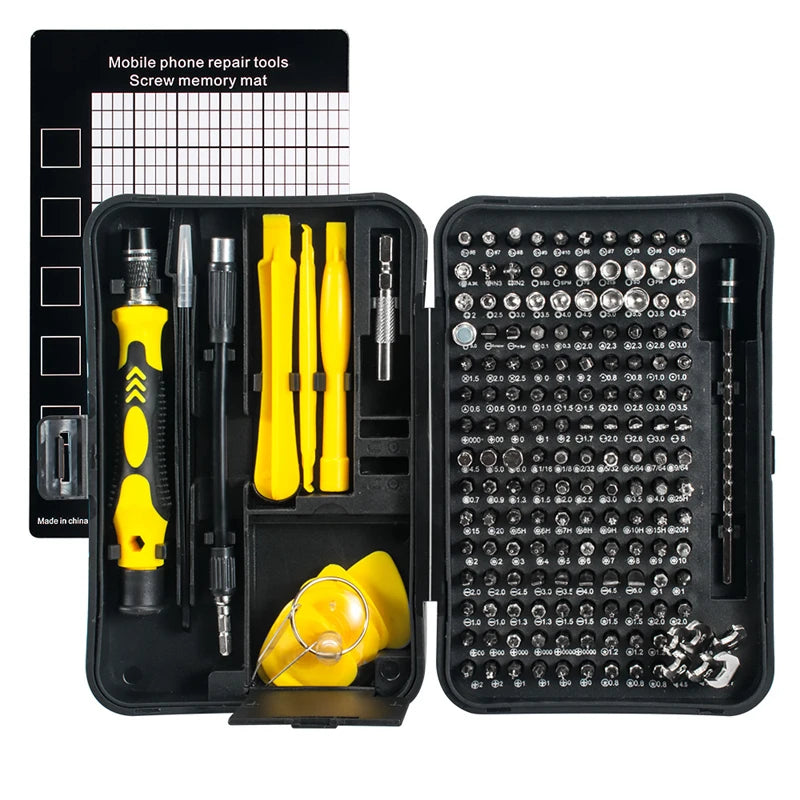
One of the most useful upgrades for beginners is using a complete precision toolkit designed for electronics work. A magnetic bit system helps prevent lost screws while reducing accidental slips that scratch sensitive surfaces.
👉 Explore the 170-in-1 Magnetic Screwdriver Set for safer, easier electronics repair at home.
💡 See it in action
Why Beginners Should Learn Electronics Repair
Repairing electronic devices builds practical skills that help you save money, reduce waste, and extend product life. Simple repairs like replacing batteries, cleaning ports, tightening hinges, or swapping worn buttons are easier than many people expect.
Many users throw away devices that only need a basic fix. Learning beginner-friendly repair methods helps avoid unnecessary replacements.
Benefits of learning home electronics repair
- Save money on minor repairs
- Reduce electronic waste
- Improve confidence handling devices
- Fix common issues faster
- Avoid long repair shop wait times
- Protect important devices during travel
Travelers especially appreciate these skills. Imagine your portable power bank stopping mid-trip because a battery connector loosened. A simple toolkit and a calm repair process could solve the issue in minutes.
Many organized DIY users also keep their repair gear inside compact storage systems similar to those found in Gear Organizers & Pouches collections. Organized bits and drivers help prevent lost components during projects.
How to Fix Electronics Safely at Home
Repairing electronic devices safely starts with powering devices off, disconnecting batteries when possible, and using non-slip precision tools. Good lighting, organized screws, and steady hand positioning help beginners avoid damaging sensitive components while completing basic home repairs more confidently.
Safe repair steps every beginner should follow
- Turn off and unplug the device completely.
- Remove external batteries or disconnect power sources.
- Work on a clean, dry surface.
- Use the correct screwdriver bit size.
- Keep screws sorted by location.
- Avoid forcing stuck parts.
- Take photos during disassembly.
- Test the device carefully after reassembly.
Why safety matters during DIY repairs
Small electronics contain fragile connectors, lithium batteries, and delicate ribbon cables. Pulling too hard or using oversized tools can permanently damage them.
Static electricity is another common problem. Even a tiny static shock can affect sensitive circuits. Beginners often reduce risk by touching grounded metal before handling components.
Good lighting also improves safety. Portable repair setups benefit from reliable lighting similar to products found in Headlamps & Wearable Lights. Bright visibility reduces screw stripping and accidental cable damage.
Signs you should stop immediately
- Battery swelling
- Burning smells
- Visible sparks
- Melted wiring
- Water damage near power components
- Unusual heat during testing
These situations require professional repair support rather than beginner troubleshooting.
| Repair Situation | Safe for Beginners? | Recommended Action |
|---|---|---|
| Replacing batteries | Yes | Use precision drivers carefully |
| Cleaning charging ports | Yes | Power off device first |
| Fixing cracked screens | Sometimes | Requires patience and adhesive care |
| Repairing power supplies | No | Seek professional help |
| Replacing laptop RAM | Yes | Use anti-static precautions |
How Does a Precision Screwdriver Set Make Repairs Easier?
Repairing electronic devices becomes easier with a precision screwdriver set because magnetic bits improve control, reduce stripped screws, and fit tiny fasteners accurately. A complete kit also helps beginners repair phones, laptops, gaming controllers, watches, and household electronics without damaging sensitive parts.
A quality precision screwdriver kit can completely change your repair experience. Beginners often struggle because household screwdrivers are too large for modern electronics.
Guide to precision screwdriver set usage
The most important step is matching the correct bit to the screw head. Using the wrong size increases slipping and damages screw grooves.
- Select the exact matching bit.
- Apply gentle downward pressure.
- Turn slowly and evenly.
- Keep screws in labeled sections.
- Use magnetic bits for easier screw handling.
Magnetic screwdriver systems are especially helpful when working with tiny internal screws that easily fall into carpet or furniture.
Many users compare organized repair kits to efficient storage systems used in Camping Storage & Boxes, where every item stays separated and accessible.
Features beginners should look for
- Magnetic bit holders
- Non-slip handles
- Wide bit compatibility
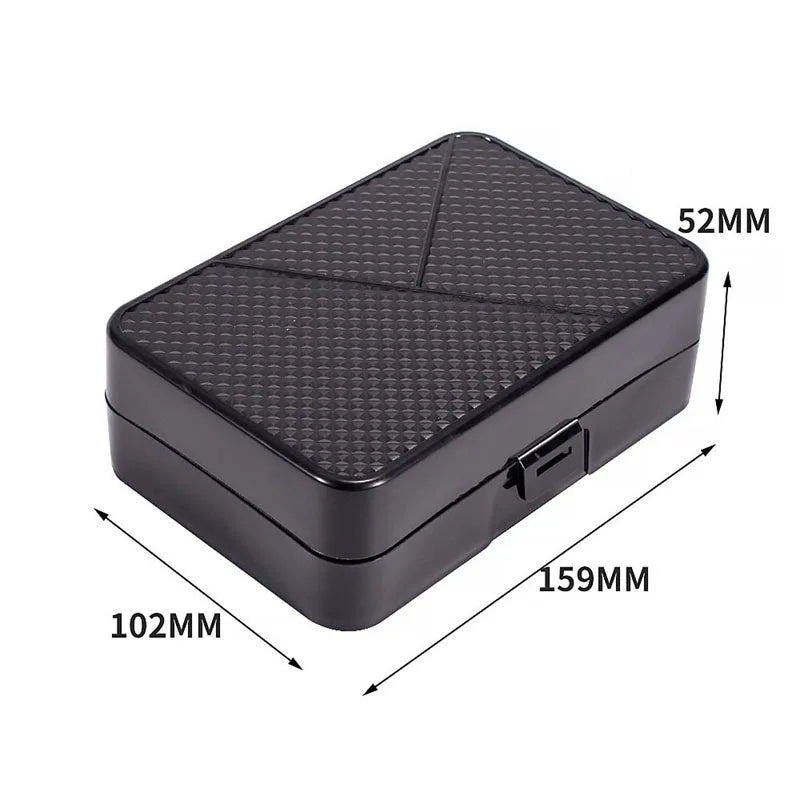
- Portable storage case
- Flexible extension shafts
- Corrosion-resistant bits
The 170-in-1 Magnetic Screwdriver Set helps beginners work on laptops, gaming consoles, cameras, smartphones, and household devices using organized interchangeable bits.
👉 Learn how the right screwdriver set helps prevent stripped screws and damaged electronics.
Real beginner experiences
One first-time DIY user shared how they almost damaged a laptop using a kitchen screwdriver before switching to a magnetic precision set. The correct bit immediately improved grip and reduced slipping.
Another beginner repaired a gaming controller successfully after organizing screws using small containers and magnetic trays.
Patience matters just as much as tools. Slow movements and proper organization often produce better results than rushing.
💡 See it in action
Common Mistakes That Damage Electronics
Beginners often damage electronics by rushing repairs, using oversized screwdrivers, forcing clips open, or losing screw organization. Understanding these common mistakes helps reduce accidents and improves the success rate of simple home repairs.
Using too much force
Many electronics use tiny clips and lightweight plastic housings. Excessive pressure can crack frames or break connector tabs.
If a part does not move easily, double-check for hidden screws before pulling harder.
Mixing up screws
Different screw lengths matter. Using the wrong screw during reassembly can puncture screens or damage circuit boards.
Simple organization methods help:
- Use labeled containers
- Arrange screws in removal order
- Take photos during each step
- Use magnetic mats if available
Ignoring moisture and dust
Dust particles can interfere with internal electronics, especially cooling systems. Moisture exposure creates corrosion risk.
Keeping repair tools protected inside dry storage setups similar to Waterproof & Dry Bags can help maintain tool quality during travel or humid conditions.
Using random substitute tools
Butter knives, coins, or oversized screwdrivers often damage tiny electronics screws. While emergencies happen, proper tools reduce long-term damage risk dramatically.
Repairing Electronics Without Right Tools
Repairing electronics without right tools is possible for very simple fixes, but improper tools increase the risk of stripped screws, cracked housings, and damaged components. Using proper precision drivers improves repair safety, accuracy, and long-term success for beginners.
Sometimes people attempt repairs using whatever is available at home. While creativity can help temporarily, it often creates new problems.
Risks of using incorrect tools
| Improvised Tool | Potential Risk |
|---|---|
| Kitchen knife | Scratched surfaces |
| Oversized screwdriver | Stripped screw heads |
| Tweezers | Connector damage |
| Coins | Slipping and injury |
| Metal pins | Electrical short circuits |
Temporary alternatives that are safer
If you absolutely must improvise:
- Use rubber bands for slightly stripped screws
- Apply gentle pressure only
- Avoid metal prying near batteries
- Stop immediately if slipping occurs
However, investing in proper tools usually costs less than replacing damaged devices.
Some DIY users also carry compact repair kits during travel alongside equipment stored in Car Organizers & Storage systems for emergency access.
Tips for Removing Tiny Electronic Screws
Tips for removing tiny electronic screws include using magnetic precision bits, applying downward pressure, choosing the correct driver size, and turning slowly to prevent stripping. Organized screw storage and proper lighting also help beginners complete electronics repairs more safely and efficiently.
Why tiny screws become difficult
Electronics manufacturers often use thread-locking compounds and miniature screw heads. Over-tightening during manufacturing can also make removal harder.
Best methods for stubborn screws
- Use the exact matching bit.
- Press down firmly but gently.
- Turn slowly instead of quickly.
- Use a rubber band for stripped grooves.
- Apply slight heat carefully if thread-lock is present.
- Keep the device stable during removal.
Helpful beginner habits
- Work in bright lighting
- Keep hands dry
- Use anti-slip mats
- Avoid distractions
- Separate removed screws immediately
Good visibility is essential during tiny screw removal. Many repair hobbyists use portable lighting options similar to products in Emergency Lighting collections for focused illumination.
What to do if a screw is stripped
Stripped screws are one of the most frustrating repair problems. Fortunately, there are several beginner-friendly options.
- Place a rubber band between the screw and bit
- Use a wider compatible precision bit carefully
- Try needle-nose pliers for raised screw heads
- Apply slow, consistent pressure
Avoid drilling unless you have advanced repair experience.
Best Home Electronics You Can Fix Yourself
Not every repair requires advanced technical knowledge. Many common household electronics have beginner-friendly fixes.
Simple repairs beginners often succeed with
- Replacing TV remote batteries
- Cleaning charging ports
- Swapping gaming controller shells
- Installing laptop memory
- Replacing wireless mouse batteries
- Tightening loose hinges
- Cleaning fan vents
Devices that require more caution
- Microwaves
- Power supplies
- Large televisions
- Devices with swollen batteries
- Water-damaged electronics
Beginners should focus on low-risk projects first to build confidence gradually.
Many users compare beginner repair learning to outdoor skill building. You start with smaller, manageable tasks before handling more advanced situations.
How organization improves repair success
Messy workspaces increase the chances of lost screws and damaged components. Organized setups reduce stress and improve concentration.
Compact containers similar to products in Hooks, Clips & Carabiners collections can help keep repair accessories accessible and secure.
How Organized Workspaces Prevent Repair Mistakes
Repairing electronic devices is easier when your workspace is clean, well-lit, and organized. Proper setup reduces lost screws, accidental damage, and repair frustration while helping beginners work more confidently and efficiently on delicate electronics.
Workspace organization matters more than many beginners realize. Even simple changes improve repair accuracy.
Ideal beginner repair setup
| Workspace Item | Why It Helps |
|---|---|
| Bright lighting | Improves visibility |
| Magnetic tray | Prevents lost screws |
| Soft repair mat | Protects devices from scratches |
| Small containers | Separates components |
| Precision toolkit | Improves control |
Reducing stress during repairs
Repairs become frustrating when screws disappear or cables disconnect unexpectedly. A calm, organized setup improves focus and patience.
Some users even prepare repair spaces with comfort-focused accessories similar to products in Seat Cushions & Pads to reduce strain during long repair sessions.
Storage habits that help long term
- Return bits to labeled slots
- Keep batteries separated
- Store tools in dry areas
- Clean dust from handles regularly
- Inspect worn bits before use
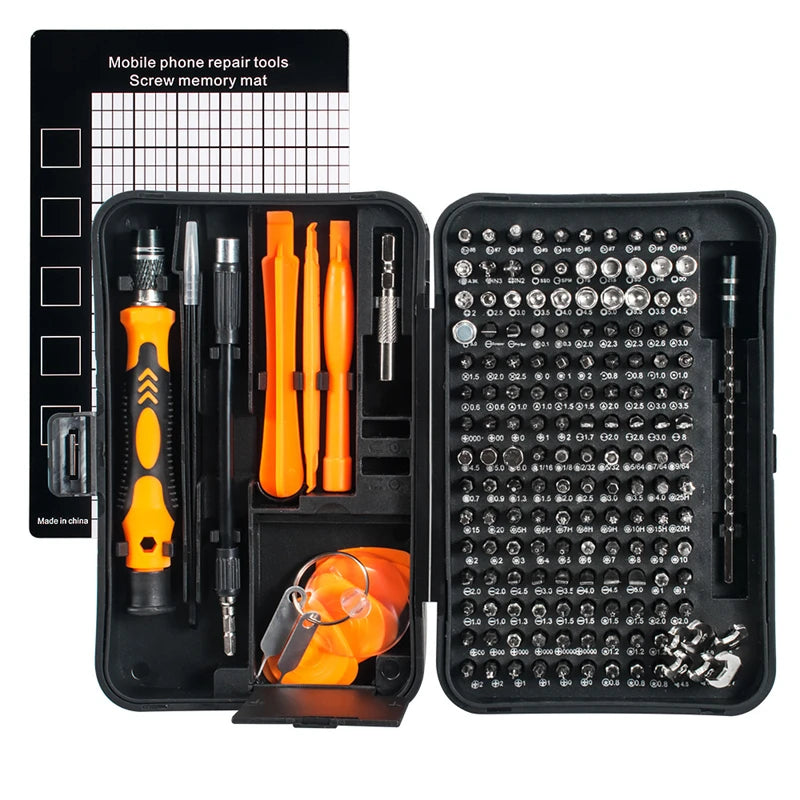
The 170-in-1 Magnetic Screwdriver Set includes organized storage that helps beginners avoid clutter and missing components.
👉 Upgrade your repair setup before your next device fix and avoid stripped screws or missing parts.
💡 See it in action
When You Should Stop and Call a Professional
DIY repair is useful, but some situations require professional help.
Repairs beginners should avoid
- High-voltage power systems
- Severely water-damaged devices
- Motherboard soldering
- Cracked lithium batteries
- Burned electrical components
Attempting advanced repairs without training can create safety hazards or permanently damage expensive electronics.
How to recognize unsafe conditions
If a device smells burnt, overheats rapidly, or sparks during testing, stop immediately. Disconnect power and seek professional assistance.
Safety always matters more than saving money on repairs.
Beginner Tool Checklist
Starting with the right equipment improves both safety and success rates.
Recommended beginner repair essentials
- Precision screwdriver set
- Magnetic bit holder
- Tweezers
- Anti-static cloth
- Plastic pry tools
- Bright portable lighting
- Small storage containers
Why magnetic tools help beginners
Tiny screws are easy to lose, especially during phone or laptop repairs. Magnetic precision drivers hold screws securely during removal and installation.
Many first-time repair users say magnetic tools dramatically reduced frustration during delicate projects.
The 170-in-1 Magnetic Screwdriver Set is especially useful for beginners who want broad compatibility across phones, laptops, gaming devices, watches, cameras, and household electronics.
Conclusion
Repairing electronic devices at home becomes much less intimidating once you understand basic safety practices, organization methods, and proper tool usage. Small repairs can save money, reduce waste, and build confidence with every successful project.
Learning how to fix electronics safely at home also protects devices from unnecessary damage caused by oversized tools or rushed repairs. Simple habits like using magnetic precision bits, organizing screws carefully, and working slowly make a huge difference.
Whether you are replacing batteries, cleaning ports, or opening gaming controllers for the first time, the right repair setup helps beginners work more safely and confidently.
Frequently Asked Questions
What is the safest way to start repairing electronic devices?
The safest way to begin repairing electronic devices is to start with simple battery replacements or cleaning tasks while using proper precision tools. Always disconnect power sources and work in a clean, well-lit area.
Can I repair electronics without professional experience?
Yes, many beginner-friendly repairs are safe when you follow instructions carefully and use the correct tools. Small repairs like replacing batteries, upgrading RAM, or cleaning charging ports are common starting points.
Why are precision screwdriver sets important?
Precision screwdriver sets fit tiny electronic screws correctly, reducing slips and preventing stripped screw heads. Magnetic bits also make handling small components much easier during repairs.
What should I do if I strip a tiny electronic screw?
You can try using a rubber band between the screwdriver and screw head for additional grip. Apply steady pressure and avoid forcing the screw aggressively.
When should I avoid DIY electronics repair?
Avoid DIY repairs involving swollen batteries, severe water damage, sparking components, or high-voltage systems. These situations may require professional repair services for safety reasons.
Related Articles:
- Organize Small Screws During Repairs Like A Pro For Stress-Free Fixing
- Lost Screws During Device Repair: How To Avoid And Recover Them Easily
Pillar Articles:





